


In June 2026, Wikimedia Canada began transitioning its donation and membership platform from PayPal to Zeffy. This platform allows us to streamline the management of donations and memberships and offer an experience better tailored to our needs. Additionally, Zeffy is a Quebec-based B Corp-certified company specifically designed for nonprofit organizations.
If you make one-time donations, simply use our Zeffy donation portal instead of PayPal the next time you’d like to support us.
If you make monthly or annual donations, you must first cancel your recurring donation on PayPal, then set up a new recurring donation through our Zeffy donation portal.
To cancel your recurring PayPal payment:
You can also consult the PayPal help page on this topic.
To set up your new recurring donation via Zeffy:
If you have a valid membership purchased before June 8, 2026
If you joined before June 8, 2025 via PayPal, your membership has been automatically transferred to Zeffy. You don’t need to do anything. To renew your membership, you’ll need to use our Zeffy membership portal. You can now set up automatic renewal for your membership.
If you want to become a member
To become a member of Wikimedia Canada, please use our Zeffy membership portal. You can now set up automatic renewal for your membership.
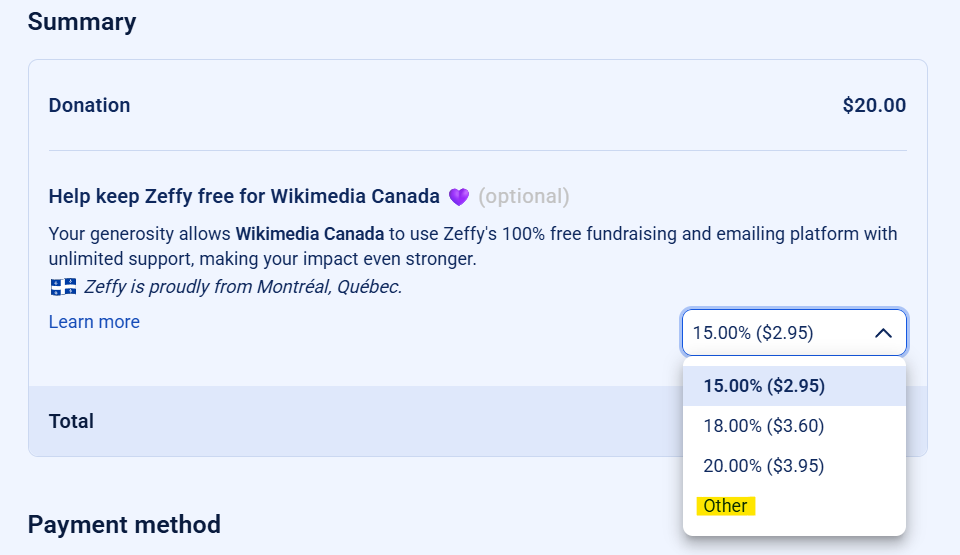
Note regarding Zeffy: on the second page, Zeffy will ask you for a tip via a banner that says “Help keep Zeffy free for Wikimedia Canada.” This additional payment is entirely optional; it applies only if you wish to support the Zeffy platform itself.
You can click on the drop-down menu, select “Other,” and then enter “0” as shown in this screenshot.