


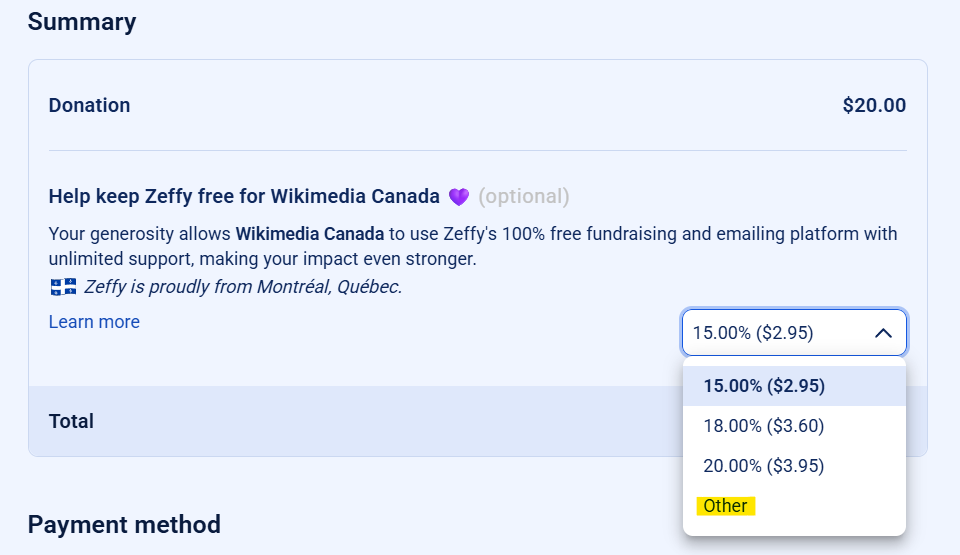
 Note regarding Zeffy: on the second page, Zeffy will ask you for a tip via a banner that says “Help keep Zeffy free for Wikimedia Canada.” This additional payment is entirely optional; it applies only if you wish to support the Zeffy platform itself.
You can click on the drop-down menu, select “Other,” and then enter “0” as shown in this screenshot.
Note regarding Zeffy: on the second page, Zeffy will ask you for a tip via a banner that says “Help keep Zeffy free for Wikimedia Canada.” This additional payment is entirely optional; it applies only if you wish to support the Zeffy platform itself.
You can click on the drop-down menu, select “Other,” and then enter “0” as shown in this screenshot.
Note regarding Zeffy: on the second page, Zeffy will ask you for a tip via a banner that says “Help keep Zeffy free for Wikimedia Canada.” This additional payment is entirely optional; it applies only if you wish to support the Zeffy platform itself.
You can click on the drop-down menu, select “Other,” and then enter “0” as shown in this screenshot.